MCP:可跨进程调用的 Tool
我们已经写了一些 tool 了:读写文件和目录、执行命令
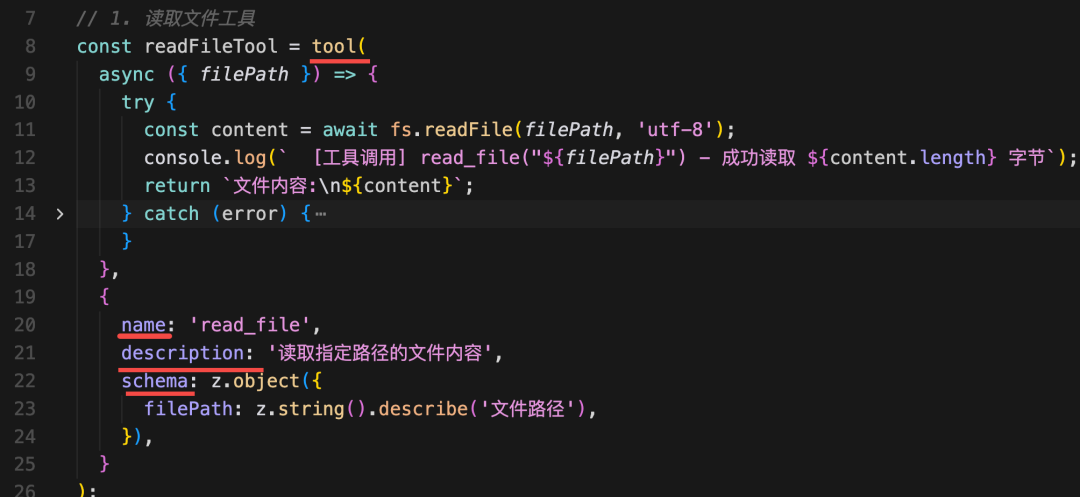
只要声明 tool 的名字、描述、参数格式,模型会在发现需要用 tool 的时候自动解析出参数传入来调用,然后把执行结果封装成 ToolMessage 传入 chat。
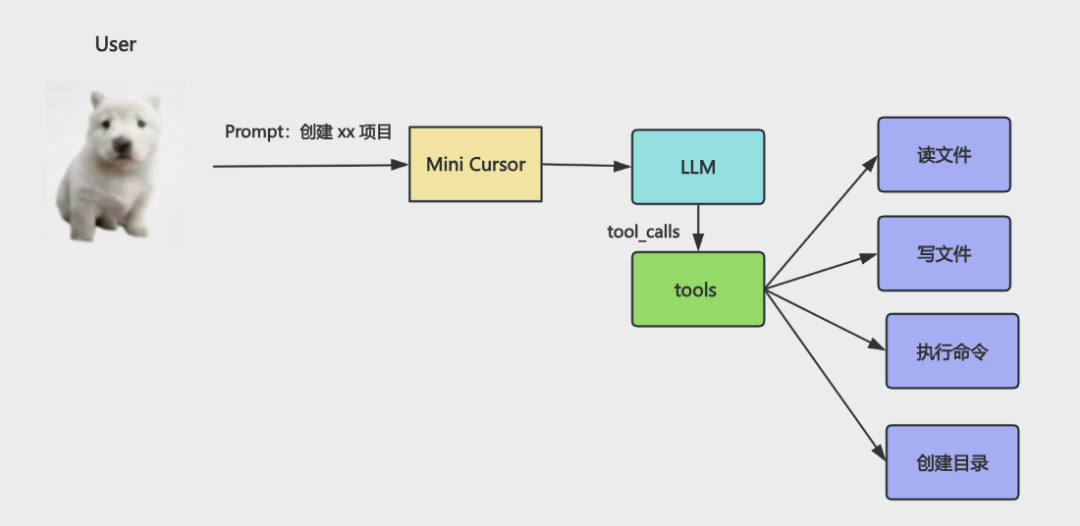
比如上节我们实现了简易的 cursor,就是声明了读写文件和目录、执行命令的 tool,这样你让大模型创建 react + vite 项目,它就会自动判断什么时候调用哪个 tool,自动实现目录、文件的创建,以及 pnpm install 和 pnpn run dev 的执行。
Video: wxv_4310360946251497479
我们只是告诉他要创建的项目,然后安装依赖跑起来。
这些 tool 怎么调用、参数是什么都是大模型自己决定的。
tool 给大模型扩展了做事情的能力,本来它只能思考,不能做事情,但是现在可以自己调用 tool 来帮你做事情了。
但你有没有发现 tool 有个问题:
node 写的 ai agent 的代码,你的 tool 也得是 node 写。
如果你之前有一些工具是 java、python、rust 写的呢?
你想封装成 tool 怎么办呢?
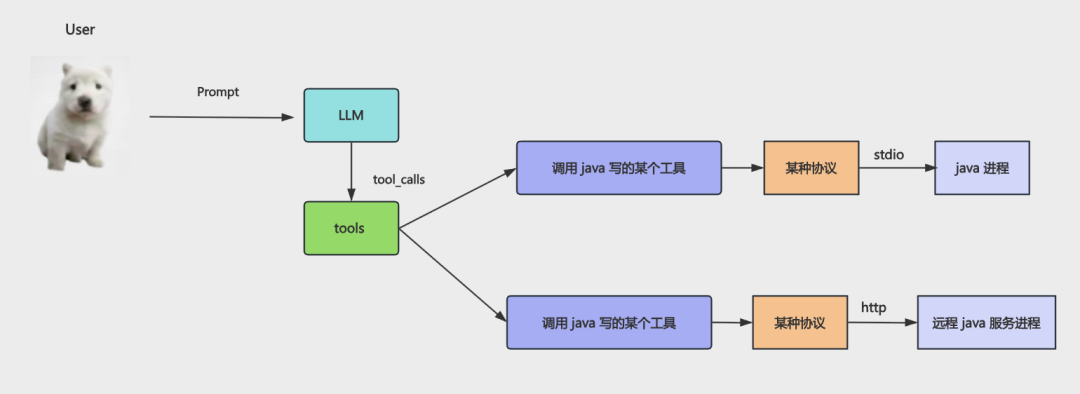
有的同学说:现在不是可以执行命令么,通过单独进程把这些其他语言写的代码跑一下就行啊。
确实,也就是这样:
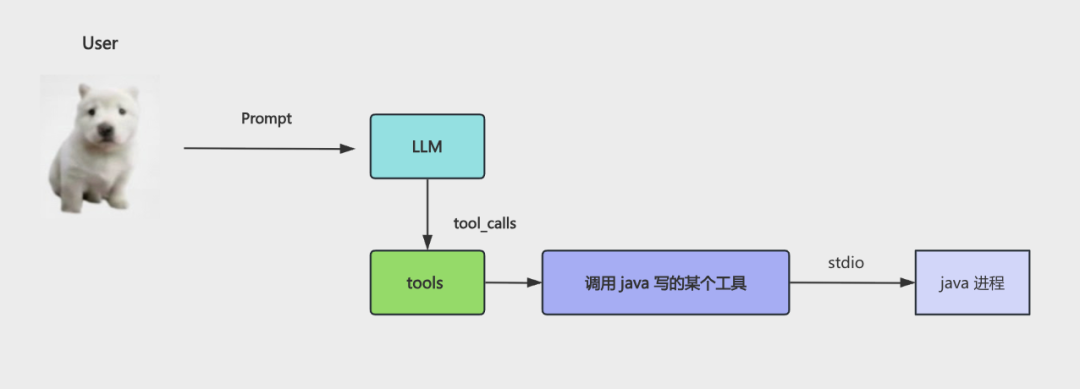
这里的 stdio 就是标准输入输出流,也就是键盘输入、控制台输出。当你进程跑一个子进程,就可以用这种方式通信。
还有的同学说:简单,用 http 啊!本地跑个服务就好了。
也就是这样:
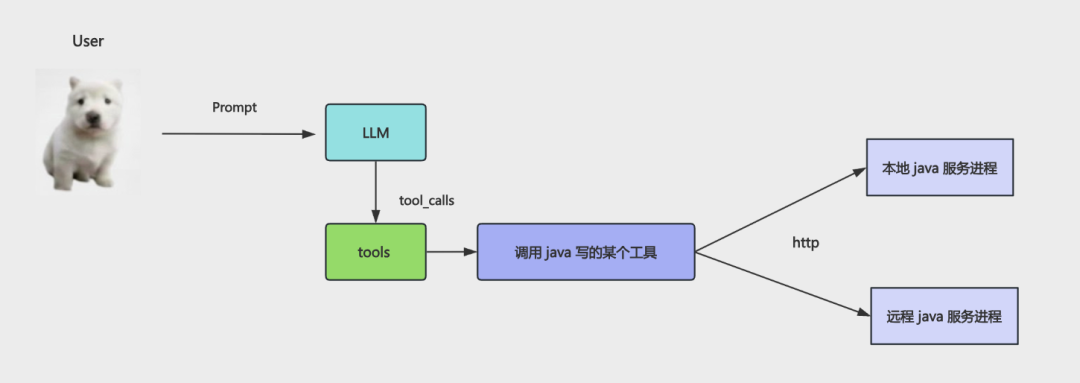
现在是解决了跨语言调用工具的问题。
那如果每个人都这样搞,它们提供的服务都不一样,我想接入别的 tool,是不是要了解每个服务都是怎么定义的呢?
能不能定义一个统一的通信协议,我们都按照这个格式来沟通,这样所有的跨进程工具调用就都可以接入了。
也就是这样:
想跨进程调用某个工具,通过这个协议通信就行。
不管是本地工具,直接跑那个进程,然后 stdio 通信。
还是远程工具,通过 http 连接远程服务进程。
这个协议叫什么呢?
是给 Model 扩展 Context 上下文,让它能做的更多,知道的更多的 Protocal 协议。
就叫 MCP 吧。
恭喜你,你发明了 MCP!
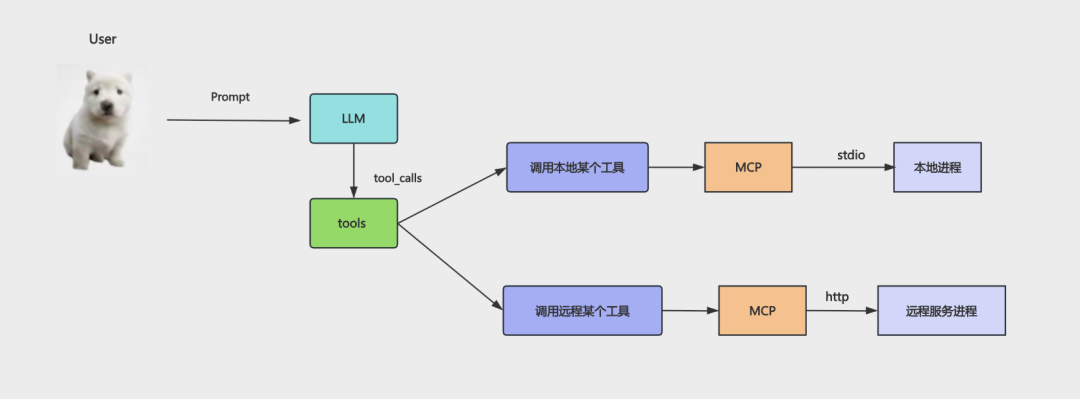
MCP 最大的特点就是可以跨进程调用工具。
跨本地的进程调用,就是用 stdio。
跨远程的进程调用,就是用 http。
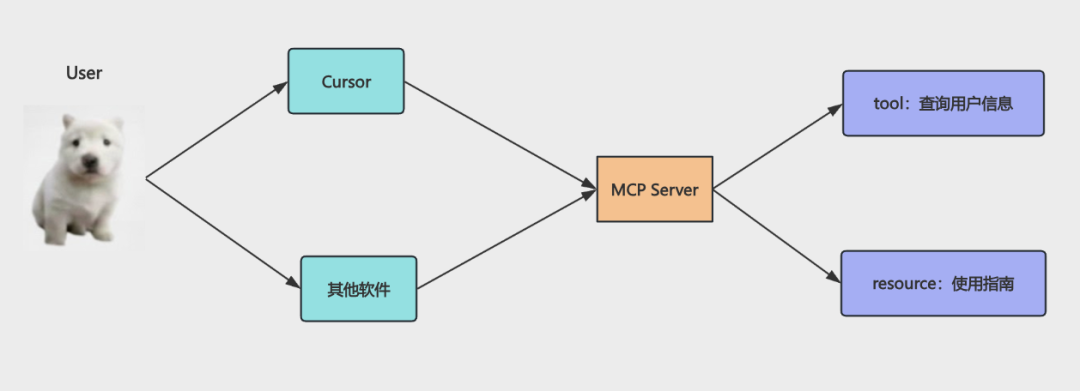
提到 MCP 都会提到这张图:
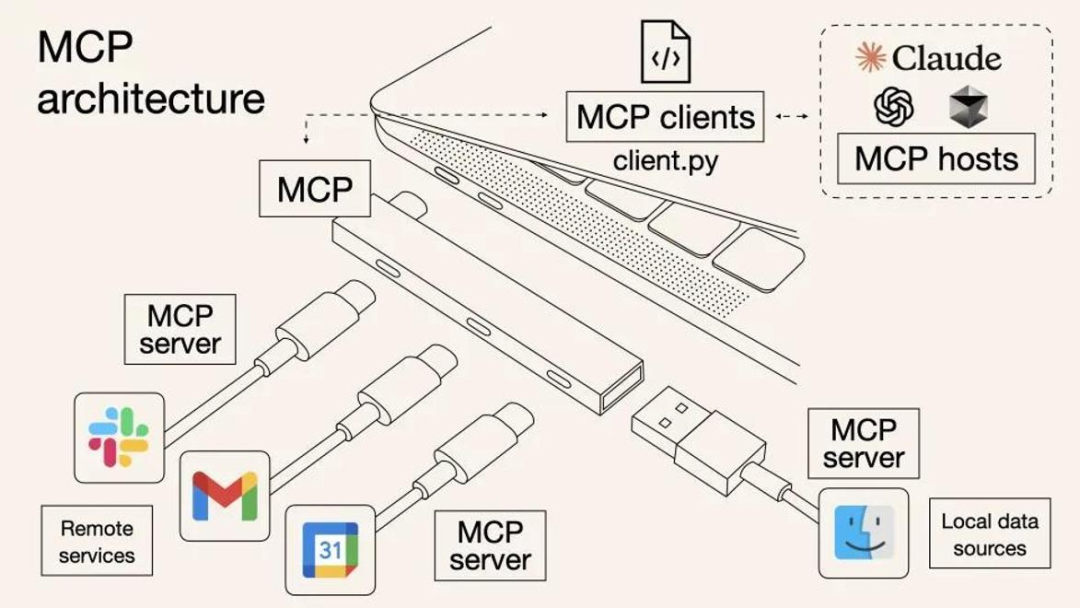
你的 ai agent 就是 MCP 客户端,可以通过 MCP 协议调用各种 MCP Server,实现跨进程的工具调用。
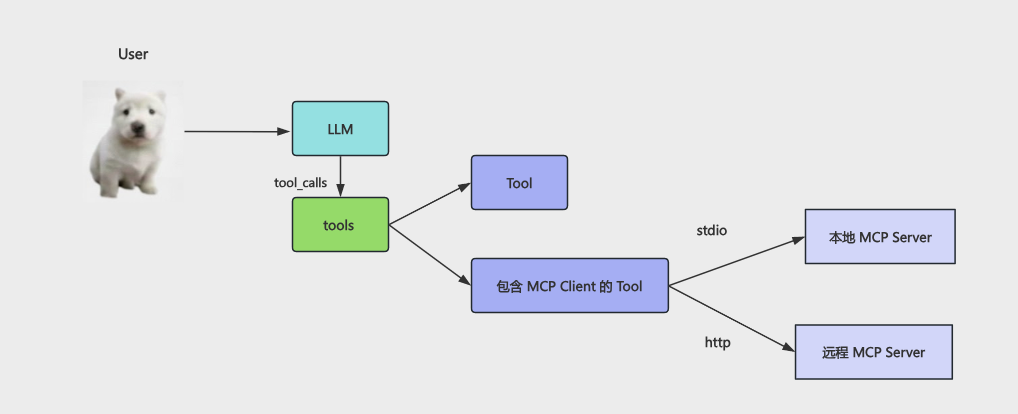
当然,在 langchain 里,它也是 tool ,只不过是 tool 的一种而已:
MCP 是由 AI 巨头 Anthropic 公司发起并开发,但是 2025 年 12 月交给了 Linux 基金会维护。
也就是说它现在是完全中立于任何一个模型的行业通用协议。
大概知道 MCP 是啥就行,我们自己来写个 MCP 服务就明白了。
继续在 tool-test 这个项目里写:
安装 mcp 的包:
pnpm install @modelcontextprotocol/sdk
从包名就可以看出来是中立于任何一家公司的。
创建 src/my-mcp-server.mjs
import { McpServer } from'@modelcontextprotocol/sdk/server/mcp.js';
import { StdioServerTransport } from'@modelcontextprotocol/sdk/server/stdio.js';
import { z } from'zod';

// 数据库
const database = {
users: {
    '001': { id: '001', name: '张三', email: 'zhangsan@example.com', role: 'admin' },
    '002': { id: '002', name: '李四', email: 'lisi@example.com', role: 'user' },
    '003': { id: '003', name: '王五', email: 'wangwu@example.com', role: 'user' },
  }
};

const server = new McpServer({
name: 'my-mcp-server',
version: '1.0.0',
});


// 注册工具:查询用户信息
server.registerTool('query_user', {
description: '查询数据库中的用户信息。输入用户 ID,返回该用户的详细信息(姓名、邮箱、角色)。',
inputSchema: {
    userId: z.string().describe('用户 ID,例如: 001, 002, 003'),
  },
}, async ({ userId }) => {
const user = database.users[userId];

if (!user) {
    return {
      content: [
        {
          type: 'text',
          text: `用户 ID ${userId} 不存在。可用的 ID: 001, 002, 003`,
        },
      ],
    };
  }

return {
    content: [
      {
        type: 'text',
        text: `用户信息:\n- ID: ${user.id}\n- 姓名: ${user.name}\n- 邮箱: ${user.email}\n- 角色: ${user.role}`,
      },
    ],
  };
});


server.registerResource('使用指南', 'docs://guide', {
description: 'MCP Server 使用文档',
mimeType: 'text/plain',
}, async () => {
return {
    contents: [
      {
        uri: 'docs://guide',
        mimeType: 'text/plain',
        text: `MCP Server 使用指南

功能:提供用户查询等工具。

使用:在 Cursor 等 MCP Client 中通过自然语言对话,Cursor 会自动调用相应工具。`,
      },
    ],
  };
});


const transport = new StdioServerTransport();
await server.connect(transport);
代码很容易看懂:
new McpServer 创建了 mcp server 实例 server.registerTool 注册了一个工具,声明 name、description、schema server.registerResource 注册了一个资源,就是静态数据
和我们写 tool 的时候差不多,只不过这里分了 resource 和 tool,resouce 一般返回静态数据,tool 来做一些事情。
最后,可以提供 stdio 的本地进程的调用方式,也可以提供 http 的远程调用方式。
这里是 stdio 的传输方式(Transport)

这样,我们的 MCP 服务就创建好了!
是不是很简单。
其实就是 tool,加上了协议而已。
我们在 cursor 里配置下这个 mcp server:
Video: wxv_4310361295939125251
配置好之后测试下:
Video: wxv_4310359713679900672
我特意换了个项目来测。
可以看到,确实检测到了这个 mcp 然后调用了!
这里 cursor 有个坑注意下:
Video: wxv_4310361737465135106
点一下 tool 是禁用,再点一下是启用。
但是 cursor 这个状态颜色区分不明显,没有调用 mcp 工具,可能你关掉了。
这就是 mcp 的好处,写好之后可以插拔到任何地方当 tool 用。
那 resource 呢?
它其实不是用来作为 tool 触发的,主要是你可以引用用来写 prompt 之类的。
比如这样:
Video: wxv_4310360155088322562
resource 主要是查询信息用的(read), 而 tool 是执行功能用的(call)
当然,因为有了 mcp,除了 cursor,别的软件同样可以调用这个服务:
我们在 langchain 代码里调用下 mcp server:
用这个包:
pnpm install @langchain/mcp-adapters
创建 src/langchain-mcp-test.mjs
import 'dotenv/config';
import { MultiServerMCPClient } from'@langchain/mcp-adapters';
import { ChatOpenAI } from'@langchain/openai';
import chalk from'chalk';
import { HumanMessage, ToolMessage } from'@langchain/core/messages';

const model = new ChatOpenAI({
    modelName: "qwen-plus",
    apiKey: process.env.OPENAI_API_KEY,
    configuration: {
        baseURL: process.env.OPENAI_BASE_URL,
    },
});

const mcpClient = new MultiServerMCPClient({
    mcpServers: {
        'my-mcp-server': {
            command: "node",
            args: [
                "/Users/guang/code/tool-test/src/my-mcp-server.mjs"
            ]
        }
    }
});

const tools = await mcpClient.getTools();
const modelWithTools = model.bindTools(tools);

asyncfunction runAgentWithTools(query, maxIterations = 30) {
    const messages = [
        new HumanMessage(query)
    ];

    for (let i = 0; i < maxIterations; i++) {
        console.log(chalk.bgGreen(`⏳ 正在等待 AI 思考...`));
        const response = await modelWithTools.invoke(messages);
        messages.push(response);

        // 检查是否有工具调用
        if (!response.tool_calls || response.tool_calls.length === 0) {
            console.log(`\n✨ AI 最终回复:\n${response.content}\n`);
            return response.content;
        }

        console.log(chalk.bgBlue(`🔍 检测到 ${response.tool_calls.length} 个工具调用`));
        console.log(chalk.bgBlue(`🔍 工具调用: ${response.tool_calls.map(t => t.name).join(', ')}`));
        // 执行工具调用
        for (const toolCall of response.tool_calls) {
            const foundTool = tools.find(t => t.name === toolCall.name);
            if (foundTool) {
                const toolResult = await foundTool.invoke(toolCall.args);
                messages.push(new ToolMessage({
                    content: toolResult,
                    tool_call_id: toolCall.id,
                }));
            }
        }
    }

    return messages[messages.length - 1].content;
}

await runAgentWithTools("查一下用户 002 的信息");
我们用 @langchain/mcp-adapters 创建了 mcp client
写法和 cursor 里配置一样:
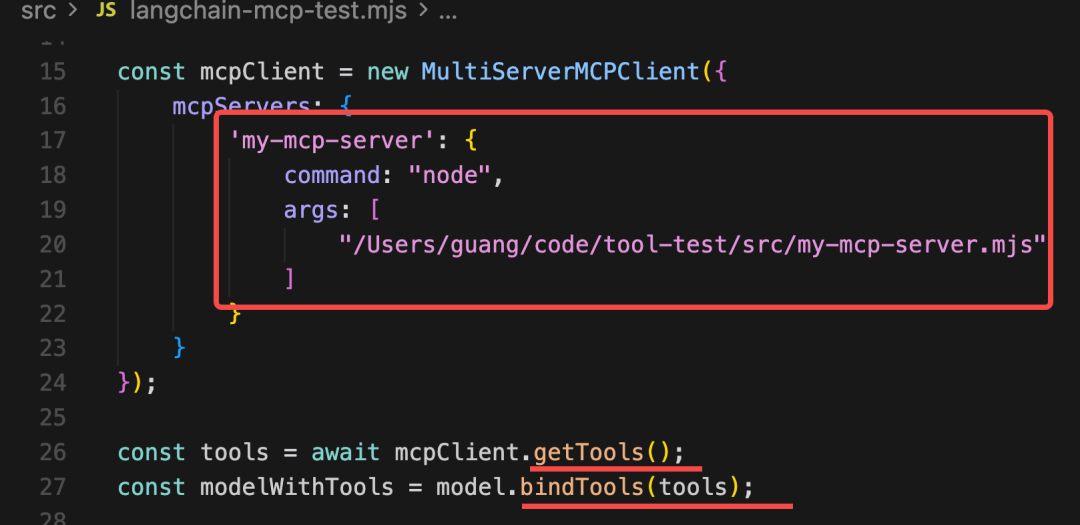
就是用命令行启动这个进程,之后用 stdio 的方式做通信。
拿到 tools 之后绑定到模型。
模型调用返回 tool_calls 消息需要自己调用 tool,调用完通过 ToolMessage 封装返回的消息,继续调用。
这个循环我们写过很多次了。
调用下试试:
Video: wxv_4310362793221652480
可以看到,你让大模型查询用户,它识别到了工具调用,然后调用了 mcp 的工具。
这里进程没退出,因为你跑了一个子进程作为 mcp server,需要把那个关掉才可以:
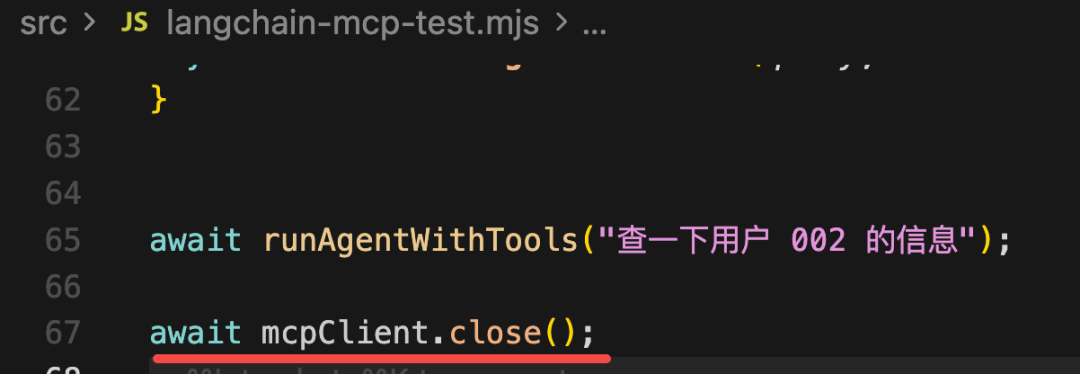
await mcpClient.close();
Video: wxv_4310363126568157185
那 resource 怎么用呢?
那种静态信息可以放到 system message 里。
我们先查一下 resource:
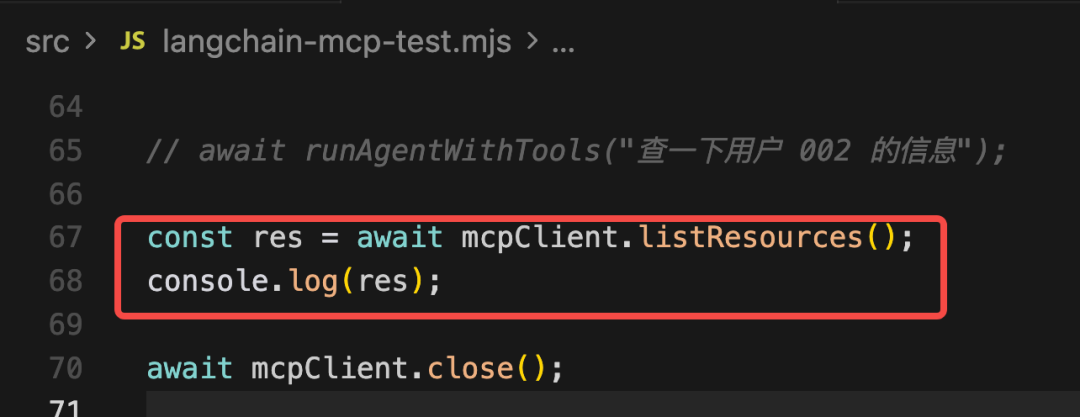
const res = await mcpClient.listResources();
console.log(res);
Video: wxv_4310362456989466624
遍历依次读取 uri 内容
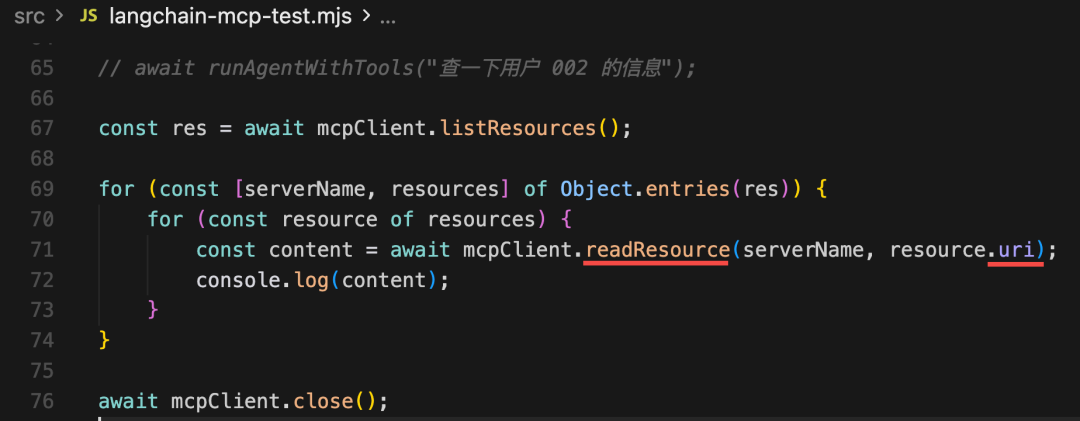
const res = await mcpClient.listResources();

for (const [serverName, resources] of Object.entries(res)) {
    for (const resource of resources) {
        const content = await mcpClient.readResource(serverName, resource.uri);
        console.log(content);
    }
}
Video: wxv_4310363401630613505
然后只要把它放到 system message 里作为上下文就好了:
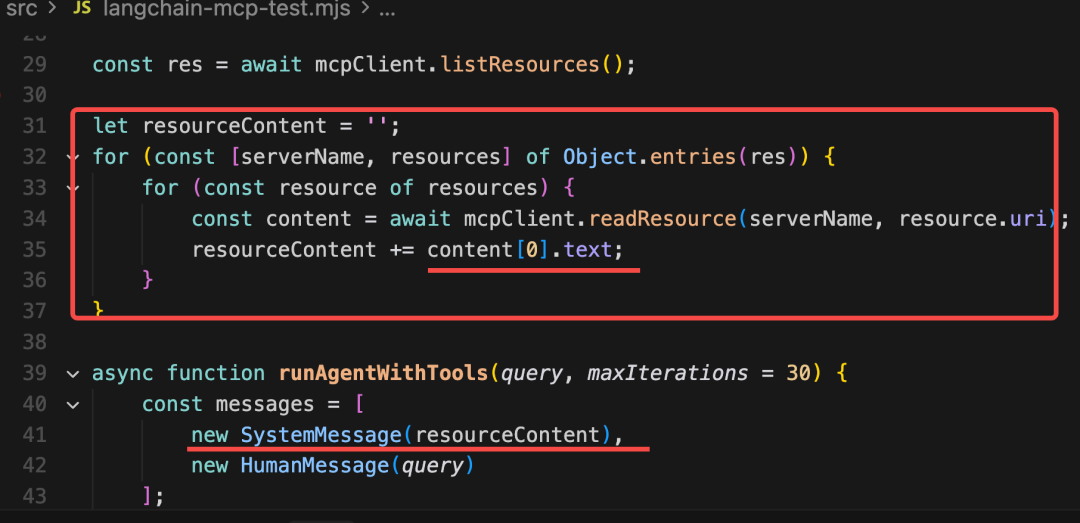
const res = await mcpClient.listResources();

let resourceContent = '';
for (const [serverName, resources] of Object.entries(res)) {
    for (const resource of resources) {
        const content = await mcpClient.readResource(serverName, resource.uri);
        resourceContent += content[0].text;
    }
}
const messages = [
    new SystemMessage(resourceContent),
    new HumanMessage(query)
];
调用下:
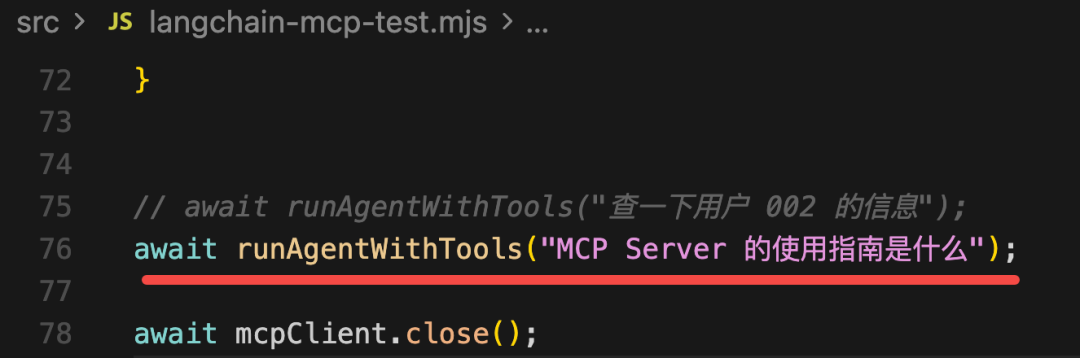
await runAgentWithTools("MCP Server 的使用指南是什么");
跑一下:
Video: wxv_4310362203938832385
现在,大模型就知道这个 resource 的信息,可以用来回答问题了。
resource 可以用在 system message 里,也可以用在 human message 里,总之,是作为信息引用的。
我们主要还是用 mcp 的 tools。
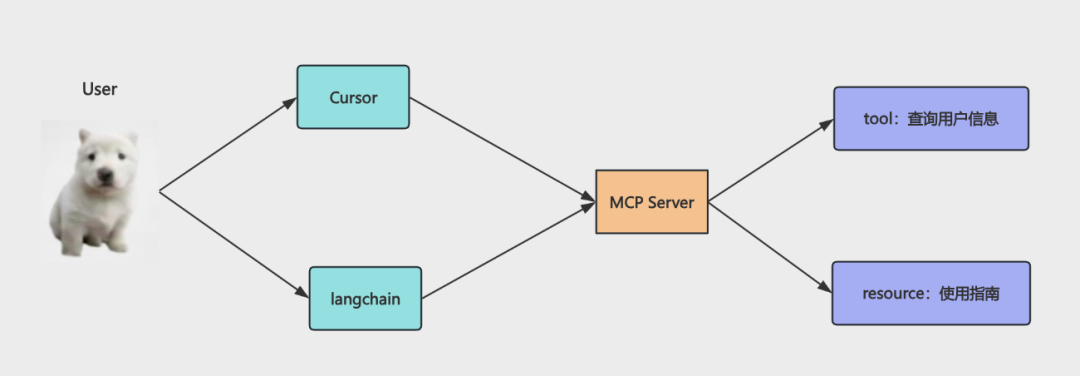
这样,我们就写了一个 mcp server,并分别在 cursor、langchain 里用了这个 mcp server。
mcp 本质上还是 tool,和之前的 tool 的区别只不过是可以跨进程调用:
当你不需要跨进程用的时候,还是之前那样写更好,还少了进程通信的成本。
代码上传了课程仓库: https://github.com/QuarkGluonPlasma/ai-agent-course-code/tool-test
总结
这节我们学了 MCP,它是可跨进程调用的 Tool。
可以是本地进程,用 stdio 进程通信。
可以是远程进程,用 http 通信。
在 langchain 里用 @langchain/mcp-adapters 封装成 tools 来用,其实和其他 tool 没区别。
跨进程就意味着不限语言,开发好之后,可以被任意 mcp client 调用,比如 cursor、langchain 等。
除了自己写 mcp server,现在也有很多现成的 mcp server 可以直接用,下节我们来用一下。